
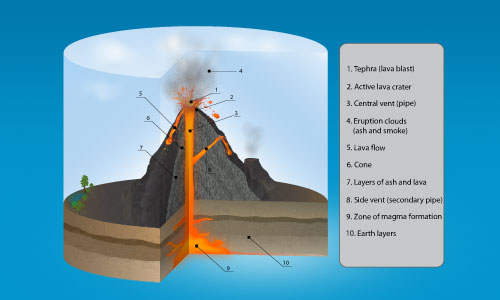

Learn how to draw 3d infographics in this new premium tutorial. I will explain how I made this 3D volcano infographics in illustrator. This tutorial will cover on how to do the cutaway illustration effect . You will also learn the techniques of using effects such as Texturizer, Mezzotint, Smudge Stick to create the texture effects. Hope you like it and find it interesting.
Requirements: Adobe Illustrator
What will you get?
- Instant download of PDF e-book (29 steps)
- Detailed step by step tutorial
- Learn the techniques to rock and earth textures
- Learn to create 3d infographics diagram from scratch
- Comes with Ai file for easy reference
Tutorial Preview:
1. Open a new web document. Select the Ellipse Tool and draw an oval shape. Next, select the Pen Tool and draw a rectangle shape. Select both shapes and Subtract from shape area to obtain the shape below. Now Copy and Paste in front this shape and use the Up arrow to move it upwards.

2. Take the Pen Tool and draw straight lines between the 2 shapes. Then with the Direct Selection Tool, select just the point shown in the image below and delete it, we don't need that point anymore.

3. Now, we have to make 3 individual parts between the first 2 shapes so that we can color them later. Make a duplicate of the top and bottom base and delete the unwanted points until you are left with the curve and 2 straight lines. Press Ctrl+J to join the points for each of the 4 corners. Repeat these steps for the middle shape and for the right shape.


4. Color the top shape(the ground) with the radial gradient from the image, colors are: (26, 26, 26) or 90% black and (109, 88, 64). For the left shape colors are: (191, 152, 104) and (109, 88, 64). For the middle shape, the color is (191, 152, 104); for the right shape(191, 152, 104) and (128, 113, 88) or any other brown earthly colors that you like.

5. Take the pencil Tool or the Pen Tool and draw a shape like in the image below on top of the left shape. Color it with the linear gradient shown using the colors: (192, 152, 104), (109, 88, 64) and (72, 51, 24). Go to Effect>Texture>Texturizer and use the values shown below. You should apply the effect after you finish making all the layer shapes.

... end of preview. Sign up for premium membership to read the whole tutorial!


Trying to download this tutorial and it keeps taking me in circles to the preview version. Where do I download the premium version?
We are LogoProDesign as a Creative Logo Designer, We checked your artwork collections. Those are amazed us. Thanks for that type of good work collections. We regularly checked your website for good artwork example.
It is extremely helpful for me since I am a science student and going the graphical work on the earths interior.Amazing post and everyone will submit their mature views regarding this article.
so many nice things in a one place.that’s the perfect idea of this site.You are highly appreciated to get more similar tutorials! many thanks and keep up the good work!
This is a really good tutorial, I would recommend this to my friends as well. Thanks