


Drawing vector wood grain effect is pretty simple in Adobe Illustrator. Here is a quick Illustrator tutorial to create wood grain effect using the warp tools in illustrator. After this tutorial, you will be able to draw nice vector wood textures.
1. Creating the stripes
Select the Rectangle Tool, and draw a thin rectangle. Using the Selection Tool, Alt/Option drag it to create a instance at the bottom. Repeat this step by pressing Ctrl/Command+D to create a row of stripes.

2. Different stripe weights
Select all the rows of stripes then go to Object>Transform>Transform Each. Enter the values above and make sure the Random field is checked to give it a random height.

3. Natural stripe effect
Double click the Warp Tool and use the settings below. Now with the Warp Tool we brush through the row of lines in a horizontal direction. This will distort the stripes giving it a more natural look.


4. Giving it a Twirl
Next we select the Twirl Tool. Double click to change to the settings above. We need a medium sized brush to the twirl on the wood grain. With the Twirl tool, lightly click on different areas to give the stripes a twirl. Do not hold for too long as it will overly distort the stripes. (Phentermine) You can change the brush size of the Twirl Tool by holding down Option+Shift /Alt+Shift.


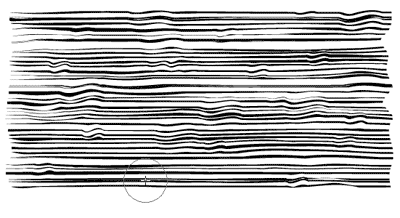
4. Pucker it
Using the Pucker Tool, with the setting above. We pucker different sections of the stripes to make the stripes contract.


4. Touch up the wood grain
To make the stripes thinner, I select all the stripes and squash it using the Transform Tool.

5. Trim the edges
Select all the wood grain and fill it with dark brown. Draw a light brown rectangle and send it to the back. Copy the rectangle by pressing Ctrl/Command+C. Next, paste it to the front by pressing Ctrl/Command+F. Select all and right click to select Make Clipping Path. This will crop away the edges.

Heres the final wood texture.
Extra Tip:
Applying the pucker effect above areas which has the twirl effect will give it a more natural look.
To download the source file for this tutorial, you will need to login as a member.
Sign up today to access all exclusive members content!

A good use of those weird Illustrator tools.
sir,
thanks
xxxx
Thanks, this was really useful, I look forward to more tutorials 🙂
Thanks a bunch! I was really hoping that I wasn’t going to have to use some gargantuan Photoshop file for my 30 inch by 60 inch art! I mainly changed brush size settings to be huge, and it worked out great. :~D
The last step photo does not look like your final artwork. What is next? How do I change the color of the lines? How do I combine the rectangle with the lines?
I have updated the tutorial. See step 5 to trim away the edges.
nice
simple but reall … TQ… 🙂
Thats cool I would have never thought of that thanks 🙂 This is creative, i love illustrator tutorials <3 I love illustrator 🙂
I have an antique rosewood armoire that has no crest.I have a walnut crest but I would like for it to appear like rosewood. If you have any suggestions,please advise.Sincerely,Bruce Stewart
hey fellas, does anyone know how to digitally implant realistic objects onto a ‘ai’ file, like for example putting a pen or a ruler object. looking realistic?
my aim is to have a presentation look like a photograph i guess. therefore showing shadows….
cheers,
Hi Ed, you can draw a realistic ruler or pen easily in illustrator using gradients. Try it.
So easy.
it is really easy. but – I have one question: how to make last step???? this one-Select all the wood grain and fill it with dark brown. Draw a light brown rectangle and send it to the back. Copy the rectangle by pressing Ctrl/Command+C. Next, paste it to the front by pressing Ctrl/Command+F. Select all and right click to select Make Clipping Path. This will crop away the edges….OK!it is gonna be finish, but I tryed couple times and it is not works.not crop eges.how to finish this wood? I did it step by step, but last one make me problem:(it doesn’t looks like wood…heeelp!!
Hi Lana, try grouping all the grain together by pressing Ctrl+G to group it. Then select the rectangle above the grain and right click to select Make Clipping Path. Hope it helps!
hey again,
another question for anyone who might know:
changing the scale of Ai patterns?
for example, having a zebra pattern on an A4 Ai document, then changing the document to a larger scale, (A1). patterns become tiles? how to avoid that?
Cheers,
Fun tutorial!
I drew lines of various lengths and widths, essentially, I made a bar code and applied the above tutorial. Really neat outcome. Very organic looking!!
pls how to do tutorial illustrator made the art picture .
pls how to made a picture art in illustrator softwar.
This is a really really good tip. You can use it in so many other applications too. Awesome!
Thanks a lot. I’m a coder who start graphims and your tutorial was perfect for me!
wow the first it makes your eyes go funny..
but otherwise great tutorial…thanks!
it was a great tutorial.thanx
Thanks, i’ts very useful!
excelente aprendi mucho!
Im Sorry I don`t speak english!!!
Excellent use of tools I hardly touch. Although I had to optimize the stripes before they would take to the mask – too many points to process. I’m drafting a Les Paul and needed the woodgrain action – thanks for the tips to get it done!
thank you
for the people who have problem with the last step
Copy the rectangle by pressing Ctrl/Command+C. Next, paste it to the front by pressing Ctrl/Command+F. once a duplicate path is been created see that one rectangle path is below the stripe layer and one above the stripe layer then Select all and right click to select Make Clipping Path
it should be done try it
thanks! 😉
Thanks, this really helped me out a lot. 🙂
ALT/OPTION what is that? not very helpful to beginners
Mick, Alt/Option is a key on your keyboard lol. Alt is for PCs, Option is for Macs.
So you hold down Alt/Option and drag to duplicate a selected object.
Lol @ AltOption 🙂
This was an awesome tutorial. I have tried different tutorials to make wood and none were as successful and fun as this one. Thanks for sharing!
Great website as well!
Nice tutorial.Thanks for sharing
nice sharing.. thanks..
Very good … Simple and clear!
boring
WHAT THE F is this
this is crap
Thank you Tony.
You’ve made it easy for a beginner.
Pat
informative tutorial..
Easy to follow! Thanks! I expected raster effects, great it’s only vectors!
Easy guide given. Thank you sir for your tutorial.
Very simple but final effect is amazing 🙂 Thx 🙂
This is awesome. Thank you so much.