


Learn how to create realistic looking popcorn using gradients in this illustrator tutorial. I will also teach you how to create a transparency glass bowl using illustrator built in effects in this tutorial. After learning these techniques, you will be able to use gradients to create volume for objects. You will also be able to create transparency glass effect after this tutorial. Simple and fun tutorial for beginners.
Requirements: Adobe Illustrator
What will you get?
- Instant download of PDF e-book (28 steps)
- Detailed step by step tutorial
- Learn the techniques to create realistic popcorn
- Learn how to transparent glass bowl
- Comes with Ai file for easy reference
Tutorial Preview:
15. Apply Inner Glow and choose the settings below.

16. Open up Transparency window apply Screen and reduce Opacity to 47% to create the glass effect.

17. We will move on to create highlights for the bowl to make it look more realistic. Draw the shape below and fill it with black. Apply Darken and set Opacity to 5%.

18. Draw another highlight shape on the right and fill it will linear gradient from white to black. Set Opacity to 8% and change it to Multiply.

19. Draw the next highlight shape near the top of the bowl. This time apply a radial gradient and set it to Screen.

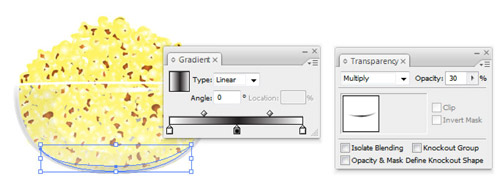
20. Now, draw the shadow at the base of the bowl and apply a linear gradient to it. Set it to Multiply and Opacity to 30%.
... end of preview. Sign up for premium membership to read the whole tutorial!


fine.but i want to get it free.please give me your suggestion & how i can develop my graphics skill.
01742923529
just wanted to add that your website is growing in popularity. Keep it up!