


Learn every detail on how to create a photorealistic rose in this premium tutorial! In this illustrator tutorial, we will show you how to draw petals using gradient mesh. You will also learn techniques to create the gradient mesh, highlights and soft edges of the petals. A tutorial not to be missed for artist who loves to create realistic drawings.
See some of the amazing photorealistic vectors created by this author.
Difficulty: Intermediate
Requirements: Adobe Illustrator
What will you get?
- Instant download of PDF e-book (20 steps)
- Learn the techniques and tricks to draw a photorealistic rose
- Discover how to draw clean and neat mesh for petals
- Comes with Ai file for easy reference
Tutorial Preview:
1. First, place the rose picture in a new Illustrator file and lock this layer. Draw a rectangle on top of it with the Rectangle Tool(M).

2. Select the Mesh Tool(U). Click on the center and add a new point.

3. Select the 3 extreme points on the left and shift it down using Direction Selection Tool(A).

4. Select Rotate Tool(R) and click on the middle point on the left edge and rotate. Do the same with the other side. Adjust the direction points of the mesh to form curved edges.
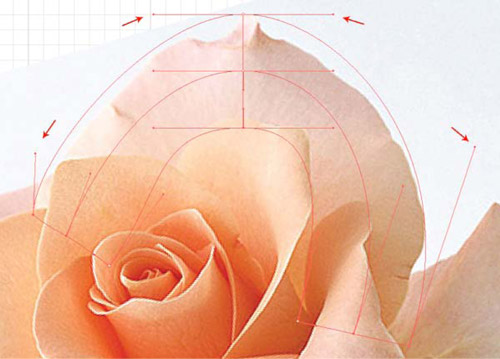
5. Let's continue to add new points using Mesh Tool(U) to areas where there will be change of color and form.
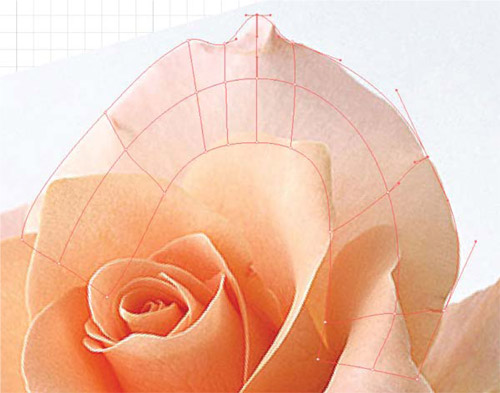
6. When the mesh is ready, we can begin to paint each point. Select the Direct Selection Tool(A) and select a point on the mesh. Then switch to Eyedropper Tool(I). We will select the color near the point.


... end of preview. Sign up for premium membership to read the whole tutorial!


Hello sir,
I want to know about your premium membership. If i pay the premium membership amount, then can i see you others tutorial on the net. Or you have any other package to teach adobe illustrator cs4 in depth.
anand
graphic designer
My Illustrator tutorial in English only here: vectordiary.com
Wow, the rose performed in vector graphic is great.
Nice concept of doing a rose in illustrator.. I like also some of the tut in this site: ctrzone.com
looks cool. Was looking forward to seeing how to create a rose not an ad for one. Thanks anyhow.
Fantastic… congratulations !!!!
It’s really fantastic. wonderful
I am a premium member now. How do I download the vector rose????
Same problem as previous commenters. How do I download the tutorials?
pls sent me a this arts ebooks file
hi, when I add a mesh point it always puts a fill on the rectangle and won’t let me remove it…how do I overcome this?
A very nice guide. I also learn from this and i created my site with this guide.. This is my site for reference nadows.com
First 9 instructions are missing here. I really need the full tutorial of this.