1276 Active Members
rope brush
photorealistic vector car
film reel
vector rose
retro micophone
wine glass
roulette wheel
tropical fruits
isometric house
picnic basket
Stock Photos at DepositPhotos.com

Illustrator Tutorial: Wooden Smoking Pipe

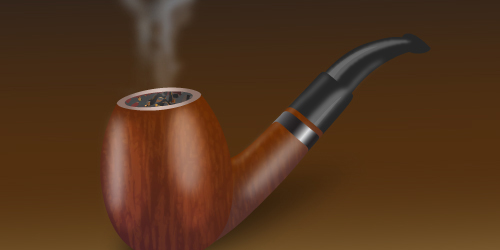
final effect

This tutorial is on how to draw a stylish smoking tobacco pipe in Adobe Illustrator. You will learn how to create wood texture illustrator effect on the pipe in this tutorial. Also, you will learn how to make the tobacco and the smoke. The steps are simple and I hope you will find it useful.

Drawing the Bowl of the Pipe

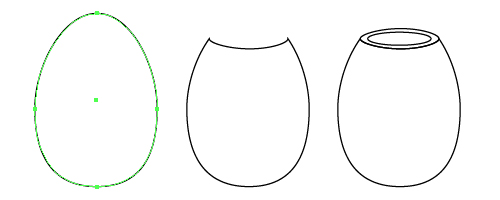
1. The first thing to do is to take the Ellipse Tool and draw an oval shape. Then select the Direct Selection Tool to move up the top point a little and also adjust the other points to get a shape like an egg. Next, draw another oval horizontally and use from the Pathfinder Panel > Subtract from shape area and Expand to obtain the second shape from the image below. Then, draw one more oval to fit the shape I just explained. Go to Object > Path > Offset Path and use a negative value to create the smaller oval shape inside.
screenshot

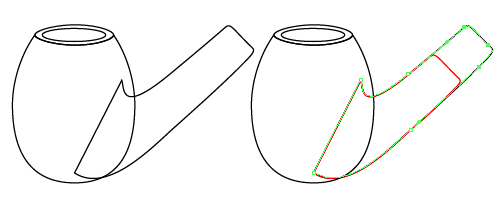
2. Use the Pen Tool to draw the shape of the shank like you see below, then Copy and Paste in front of this shape. Now, take the Direct Selection Tool and select only the points from the right and move them following the original shape to obtain the red one from the image.
screenshot

3. Next using the Pen Tool, draw the shape of the stem and also the little one as the bit of the pipe like you see below. Place the shapes in the next order: the shank behind the bowl, the stem behind the shank and the last bit behind the stem.

screenshot

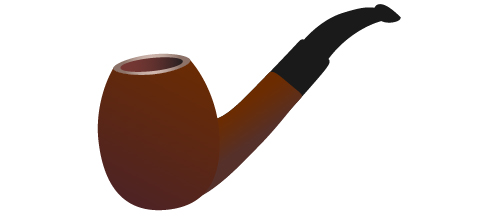
4. Now, it is time to add some colors. For the bowl and the shank, I used a linear gradient using the colors: (108,44,1) and (78,35,36). For the bigger oval a radial gradient from (215,191,182) to (139,113,103) and for the smaller oval inside a linear gradient from (117,55,51) to black. The other parts of the pipe are filled with 90% black.
screenshot

Creating the Wood Texture

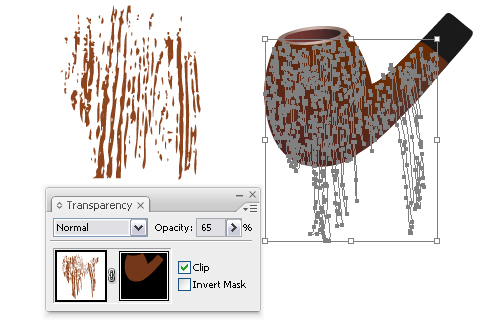
5. Let’s see how to make the wood texture. I find it easier to take a picture of wood photo and trace it. For best results, modify the values, depending on the picture. You can set it by going to Object > Live Trace > Tracing Options and also apply Effects > Warp > Twist if needed. I modified the results according to my pipe shape and place it on top. The fill color is (141,69,30). Next, copy the brown part of the pipe and select the wood texture group. Double click the black square in the Transparency Panel and paste the copied pipe shape to make an Opacity Mask. Exit the mask mode and then lower the opacity to 65%.
screenshot

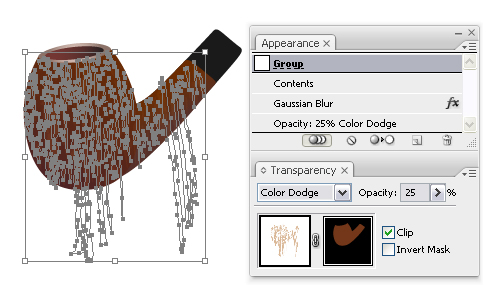
6. For a more interesting wood effect, copy again the wood texture group, paste it in front and move it a bit towards the first one. Change the fill color to (217,183,150). Next, make another Opacity Mask, apply a 0.4 px Gaussian Blur and set the mode to Color Dodge and lower the opacity to 25%.
screenshot

Adding Highlights

7. Take the Ellipse Tool and draw a shape on top of the pipe. Fill it with white and apply a 3 px Gaussian Blur. Set to Overlay and lower the opacity. Make the second one in the same way.

screenshot

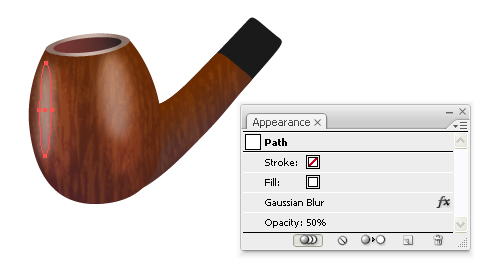
8. Draw another smaller oval on top of the previous one, apply a 5 px Gaussian Blur and reduce the opacity to 50%. Do the same with the second one like in the next image. This will add more shine to the pipe.
screenshot

9. Take the Pen Tool and draw the shape you see below and fill it with a linear gradient using different gray tones or any other metal gradient that you want. There are some in the Swatch Library also.

screenshot

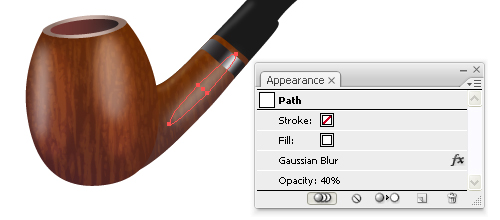
10. Draw an oval shape like in the image below, fill it with white, apply a 5 px Gaussian Blur and lower the opacity. Also adjust the gradient from the ring to fit with the position of this shape and with the next reflection if needed.
screenshot

11. Draw with the Pen Tool similar shapes to the ones below, fill them with white, apply a 2,2 px Gaussian Blur for the selected one and 1 px for the other one, then reduce the opacity for each one.

screenshot

12. Next, draw 2 more shapes on top or decrease the original ones and reduce the opacity to 8-10% to add more shine.

screenshot

Drawing Smoke and Tobacoo

13. Now, draw some shapes like little pieces of tobacco. Color them using different gray tones and add on some of them mash points using yellow and brown. Some of my colors are: (229,163,30), (120,34,0), (125,75,39) and (255,195,120). Group all the shapes, decrease their size and place them on top of the pipe. Copy the smaller oval from the beginning of the tutorial and paste it in front of the tobacco group, then go to Object > Clipping Mask > Make.

screenshot

14. To make the smoke, draw with the Pencil Tool some random paths and stroke them using brushes from the Brush Library that you like. Some of the ones I used are in the image below. I applied a 3,5-5 px Gaussian Blur according to each path and also some of them have the stroke color white and some light blue for a more interesting effect. Reduce the opacity for each one until you like the final smoke effect.

screenshot

13. The tutorial is done and I hope you like it. The final image of my smoking tobacco pipe is this:

screenshot

To download the source file for this tutorial, you will need to login as a member.
Sign up today to access all exclusive members content!


[The article is for Basic Members only. Login or sign up now to read the whole article.]
[The article is for Premium Members only. Login or sign up now to read the whole article.]

Share and Enjoy:
  • Digg
  • del.icio.us
  • Design Float
  • Reddit
  • Technorati
  • Twitter
  • StumbleUpon
See the list of all Illustrator tutorials.
Learn 101 Illustrator tips and techniques for free.


About The Author: Diana Toma

I'm a graphic designer extremely passionate about my work. I discovered Illustrator a while ago and simply love it. Since then, it has kept me busy and active.

Read all articles writen by this author

36 Trackbacks

Vectips Monthly Roundup: May 2010 | Vectips | Vectips Monthly Roundup: May 2010 | Vectips
June 3rd at 8:43 am

25 Fresh Adobe Illustrator Tutorials | stylishwebdesigner | 25 Fresh Adobe Illustrator Tutorials | stylishwebdesigner
June 16th at 12:33 pm

Best of the Vector Web – June 2010 – GFX Me | Best of the Vector Web – June 2010 - GFX Me
June 30th at 7:44 am

Best of the Vector Web – June 2010 « ~gokill-a.biz~ | Best of the Vector Web – June 2010 « ~gokill-a.biz~
June 30th at 9:33 am

Best of the Vector Web – June 2010 | CG Stream | Best of the Vector Web – June 2010 | CG Stream
June 30th at 3:16 pm

Best of the Vector Web – June 2010 | Vectortuts+ | Best of the Vector Web – June 2010 | Vectortuts+
July 1st at 1:55 am

30+ Must See Illustrator Tutorials For Designers | creativedesignmagazine.com | 30+ Must See Illustrator Tutorials For Designers | creativedesignmagazine.com
July 20th at 1:33 am

40 New And Useful Adobe Illustrator Tutorials – Noupe Design Blog | 40 New And Useful Adobe Illustrator Tutorials - Noupe Design Blog
August 23rd at 5:27 am

40 New And Useful Adobe Illustrator Tutorials | excreters.com | 40 New And Useful Adobe Illustrator Tutorials | excreters.com
August 23rd at 5:36 am

40 New And Useful Adobe Illustrator Tutorials « [indiFish] learn to be a pro designer! | 40 New And Useful Adobe Illustrator Tutorials « [indiFish] learn to be a pro designer!
August 23rd at 3:11 pm

40 New And Useful Adobe Illustrator Tutorials | LionWebMedia.com | 40 New And Useful Adobe Illustrator Tutorials | LionWebMedia.com
August 26th at 8:09 am

20 Fresh Must See Illustrator TutorialsVector Patterns | Vector Patterns | 20 Fresh Must See Illustrator TutorialsVector Patterns | Vector Patterns
August 29th at 7:08 pm

彼岸(Into the wild) » Blog Archive » 40 New And Useful Adobe Illustrator Tutorials | 彼岸(Into the wild) » Blog Archive » 40 New And Useful Adobe Illustrator Tutorials
August 29th at 9:26 pm

35 Hand-Picked Illustrator Drawing Tutorials From 2010 – Noupe Design Blog | 35 Hand-Picked Illustrator Drawing Tutorials From 2010 - Noupe Design Blog
September 14th at 5:47 am

İllüstrator de Pipo Tasarım Dersi « biileti.com | İllüstrator de Pipo Tasarım Dersi « biileti.com
September 18th at 7:18 pm

FreeDownloadSecrets.com » Absolutely Awesome Tutorials To Create (Eye-Catching) Vector Illustrations | FreeDownloadSecrets.com » Absolutely Awesome Tutorials To Create (Eye-Catching) Vector Illustrations
November 5th at 8:11 pm

50 Fresh and Practicable Adobe Illustrator Tutorials | 50 Fresh and Practicable Adobe Illustrator Tutorials
November 29th at 4:03 pm

50 Fresh and Practicable Adobe Illustrator Tutorials | Free Web Design Tucson | 50 Fresh and Practicable Adobe Illustrator Tutorials | Free Web Design Tucson
November 30th at 12:40 pm

50 Fresh And Practicable Adobe Illustrator Tutorials | :: DesignZine :: | 50 Fresh And Practicable Adobe Illustrator Tutorials | :: DesignZine ::
December 1st at 12:31 pm

50佳最新photoshop插画设计教程 | eBule | 50佳最新photoshop插画设计教程 | eBule
December 4th at 8:17 pm

15 Detailed Drawing Tutorials For Adobe Illustrator | YusraBlog | 15 Detailed Drawing Tutorials For Adobe Illustrator | YusraBlog
January 14th at 8:44 am

35 Hand-Picked Illustrator Drawing Tutorials From 2010 | Woupe Design Blog | 35 Hand-Picked Illustrator Drawing Tutorials From 2010 | Woupe Design Blog
February 17th at 1:08 pm

50 Fresh And Practicable Adobe Illustrator Tutorials « DownGraf – Your Graphic World | 50 Fresh And Practicable Adobe Illustrator Tutorials « DownGraf – Your Graphic World
February 27th at 5:06 am

Improve Your Illustrator Skills – Noupe Design Blog | Improve Your Illustrator Skills - Noupe Design Blog
April 15th at 4:41 am

» Improve Your Illustrator Skills – 371th Edition Akira Designs | » Improve Your Illustrator Skills – 371th Edition Akira Designs
May 27th at 9:50 am

» Improve Your Illustrator Skills – 441th Edition Akira Designs | » Improve Your Illustrator Skills – 441th Edition Akira Designs
June 8th at 10:32 am

100 Best of Tutorials Using Adobe Illustrator | 100 Best of Tutorials Using Adobe Illustrator
June 17th at 9:29 am

30 Fresh Detailed Drawing Tutorials for Adobe Illustrator | Web Design Core | 30 Fresh Detailed Drawing Tutorials for Adobe Illustrator | Web Design Core
July 16th at 9:06 am

30+ Tutorials That Will Teach You Illustrator | Arbenting | 30+ Tutorials That Will Teach You Illustrator | Arbenting
August 2nd at 8:31 pm

30 Illustrator Tutorials for Beginner, Intermediate and Advance « DownGraf – Design weblog for designers | 30 Illustrator Tutorials for Beginner, Intermediate and Advance « DownGraf – Design weblog for designers
August 14th at 8:31 pm

Como dibujar una pipa con textura de madera en Illustrator | Photoshop y Tutoriales | Como dibujar una pipa con textura de madera en Illustrator | Photoshop y Tutoriales
October 5th at 10:47 am

The Top Christmas Tutorials Exclusively for Adobe Illustrator « A Creative Designer's Blog | The Top Christmas Tutorials Exclusively for Adobe Illustrator « A Creative Designer's Blog
November 1st at 6:02 am

30 Awesome Character Design | Vector Radar – Best Collection of Vector Tutorials | 30 Awesome Character Design | Vector Radar - Best Collection of Vector Tutorials
November 29th at 1:13 am

Mohsin Ahmed | Blog | Illustrator Tutorial: Wooden Smoking Pipe | Mohsin Ahmed | Blog | Illustrator Tutorial: Wooden Smoking Pipe
December 16th at 12:34 am

20 Best Illustrator Tutorials | 20 Best Illustrator Tutorials
January 17th at 11:41 am

รวม 20 ลิ้งสอนการแต่งภาพด้วย Illustrator | ไอทีสนุกดอทคอม | รวม 20 ลิ้งสอนการแต่งภาพด้วย Illustrator | ไอทีสนุกดอทคอม
January 18th at 11:12 am

+Add Comment9 Comments

  1. Gravtar for e11world
    e11world May 26th

    Nice result and very easy to follow. Great tutorial!

  2. Gravtar for Ashok
    Ashok May 29th

    I liked much.Thanks

  3. Gravtar for Tutorial Lounge
    Tutorial Lounge June 3rd

    really beautiful tutorial with some helping techniques.

  4. Gravtar for Amy
    Amy June 3rd

    really beautiful tutorial with some helping techniques.

  5. Gravtar for suhaemespr
    suhaemespr June 16th

    rhank u very much

  6. Gravtar for Xplore Studio
    Xplore Studio July 13th

    Thanks for your very helpful tutorial – this technique will really come in usefull.

  7. Gravtar for Sumit Ohri (Sam)
    Sumit Ohri (Sam) July 20th

    thanku so much sir 4 teaching us hw to mke an Wooden Smoking Pipe Tutorial……..Me also Dng Animationcourse 4m Arena Inst. at MOHALI…..
    I want to b a Succesful Animator…..

  8. Gravtar for Amr Farid
    Amr Farid July 27th

    Awesome tutorial … very good details very creative.

  9. Gravtar for Chesster
    Chesster September 11th

    Ceci n’est pas une pipe!

Add a Comment

(required)

(will not be published)

rss or subscribe via email


Write an illustrator tutorial and get paid $150 for each tutorial! Your bio and website will also be included to increase your exposure.

Find out more»


About Vectordiary

Vector Diary is a popular blog offering great illustrator tutorials and tips. It was created by Tony Soh, a graphic designer, who has great passion in illustration. Tony has written one of the most popular tutorial to learn illustrator and has helped more than 20,000 people. On top of that, his tutorials and tips has helped designers improve their illustration skills and have received great feedback. So join Vector Diary and start learning today!

Write a Tutorial

Get paid $150 for each approved tutorials! Any writers who are passionate about sharing their illustrator techniques can contribute.

Learn how »

Premium Tutorials


All Content & Theme Design © 2008 - 2011 Vectordiary. Privacy Policy | Sitemap