Vectordiary

Illustrator tutorials, tips and tricks on vector art by iStockphoto exclusive artist. Enjoy free vector downloads.

Hello Guest! | Log in| Register

Illustrator Trick #6: Copying Text Styles with Eyedropper


Colorpicking character style

Most people thought that the Eyedropper tool is used for picking colors or gradients in Illustrator. However, not much people knows that the eyedropper can be used for picking character styles and appearances. To do this, select the text you want to change and select the Eyedropper tool. Using the Eyedropper tool, pick the text style you want to copy from and it will set you current text to that new style.

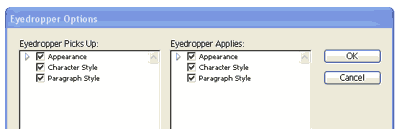
You can also set the options you want to pick by double clicking the eyedropper to display the Eyedropper options window.

Appearance - Color of the text
Character Style - Font of the text
Paragraph Style - Paragraph settings of the text

colorpicking character options

Back to 101 Illustrator Tips & Tricks ยป

Support Vectordiary by sharing it:
  • Digg
  • del.icio.us
  • Reddit
  • StumbleUpon
  • Technorati
  • Design Float
  • Twitter

About The Author: Tony Soh

Hi. I'm the founder of Vector Diary. Illustrator is my passion and I have written numerous tutorials on illustrator helping people learn illustrator. My most popular tutorial on learning illustrator in 30 days has been a hit. It makes learning illustrator so easy and has benefited more than 20,000 people worldwide. Also, I've revealed some of my secret techniques in the premium tutorials. So don't forget to check it out!

Read all articles writen by this author

1 Trackbacks

w3feeds » Blog Archive » February - 2009 PART - 6 All latest news for web design ,development, open sources, techonoly and favorites | w3feeds » Blog Archive » February - 2009 PART - 6 All latest news for web design ,development, open sources, techonoly and favorites
March 2nd, 2009 at 2:09 pm

+Add Comment2 Comments

  1. Gravtar for Mike
    Mike May 23rd, 2009

    thanks for the quick tip, the double click gives a lot more options to the eyedropper tool !

  2. Gravtar for chia jn
    chia jn June 15th, 2009

    this really helps a lot, as i miss copying attributes in freehand.

Add a Comment

(required)

(will not be published)

join membership
Vector Valley
rss or subscribe via email


Write an illustrator tutorial and get paid $150 for each tutorial! Your bio and website will also be included to increase your exposure.

Find out more»


About Vectordiary

Vector Diary is a popular blog offering great illustrator tutorials and tips. It was created by Tony Soh, a graphic designer, who has great passion in illustration. Tony has written one of the most popular tutorial for learning illustrator and has helped more than 20,000 people. On top of that, his tutorials and tips has helped designers improve their illustration skills and have received great feedback. So join Vector Diary and start learning today!

Write a Tutorial

Get paid $150 for each approved tutorials! Any writers who are passionate about sharing their illustrator techniques can contribute.

Learn how »

My Network


All Content & Theme Design © 2008 Vectordiary. Hosted by Media Temple

Powered by WishList Member