
1276 Active Members
rope brush
photorealistic vector car
film reel
vector rose
retro micophone
wine glass
roulette wheel
tropical fruits
isometric house
picnic basket
Stock Photos at DepositPhotos.com

Illustrator Tip #20: Funky Cartoon Mascots Design

cartoon mascot

This is a very quick tutorial that will teach you how to draw funky music themed cartoon mascots. You can use it to tile it up to create a nice wallpaper or for book cover.

Drawing the Characters

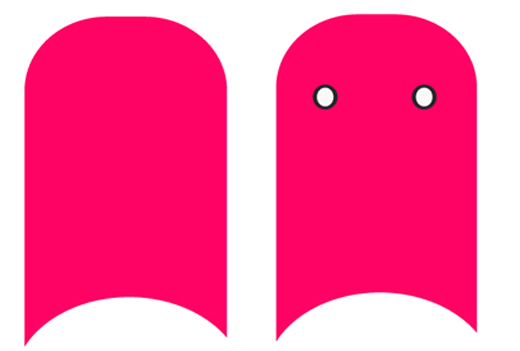
1. Open up a new file, using the color #FF0364 draw a body shape like this. Select the circle tool and draw two circles to make an eye shape.
cartoon

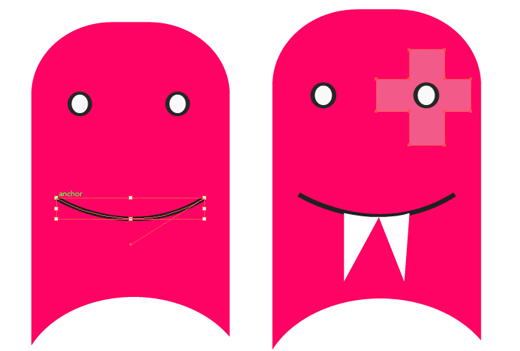
2. Select the pen tool, make the Fill color none and the stroke color black. Draw a Smiley face. With the fill color white and stroke color none draw a set of fangs. With the color #f25a89 select the rectangle tool and draw a cross shape, with the 2 shapes selected go to Path Finder and click Exclude.
cartoon

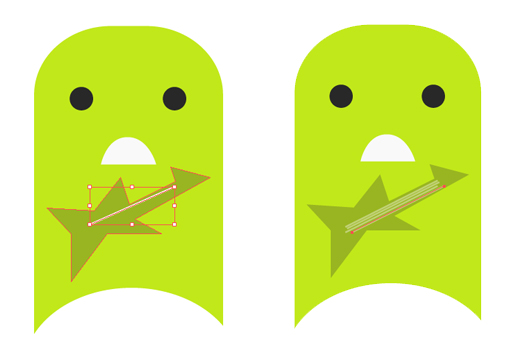
3. Create a new layer for the next character. Copy and pasted the body shape from the previous character and make the color #c1e81b. Draw some eyes with the circle tool and a mouth with the Pen tool. With the again pen tool draw a guitar shape with the color #98b422.

cartoon

4. With the fill color none and stroke color #b6ca61 draw some guitar strings with the pen tool.
cartoon

5. Create a new layer for the next character and copy and paste the body, change the color to #0fc8f4. With the circle tool draw some eyes, with the pen tool draw a mouth. Using the rectangular tool draw some keys using the colors #04c3d8 and #f9faf9.

cartoon

6. Now to create the singer! Create a new layer, copy and paste the body and make the color #ffd112. Using the color #f5b400 create a circle for the right side of the face. With the circle tool draw some eyes, then draw a mouth shape, tooth, and tongue with the pen tool. With the fill color none and stroke color a dark grey draw some eyebrows.

cartoon

Creating the Pattern

7. Selecting each character place them into an arrangement like this.

cartoon

8. Select one of the rows and duplicate the characters. Change each of the body character’s color to #161616 and other colors to a light grey like this.

cartoon

Share and Enjoy:
  • Digg
  • del.icio.us
  • Design Float
  • Reddit
  • Technorati
  • Twitter
  • StumbleUpon
See the list of all Illustrator tutorials.
Learn 101 Illustrator tips and techniques for free.


About The Author: Ainsley

Ainsley Bevis is a Freelance graphic designer who loves to create fun and eye-catching work. She started her own company called Bloom Web Design and is dedicated and motivated to producing great work for her clients.

Read all articles writen by this author

4 Trackbacks

Promoting Your Work with Vector Art Wallpaper Giveaways | cssWOW:: CSS Gallery | Promoting Your Work with Vector Art Wallpaper Giveaways | cssWOW:: CSS Gallery
October 5th at 9:44 pm

Promoting Your Work with Vector Art Wallpaper Giveaways « Miami Beach Web Designer | Promoting Your Work with Vector Art Wallpaper Giveaways « Miami Beach Web Designer
October 6th at 5:21 am

Promoting Your Work with Vector Art Wallpaper Giveaways- rampantdesigntools.com | Promoting Your Work with Vector Art Wallpaper Giveaways- rampantdesigntools.com
October 8th at 4:52 pm

Maskottchen und Character Tutorials | GFC Theme | Maskottchen und Character Tutorials | GFC Theme
October 18th at 1:12 pm

+Add Comment5 Comments

  1. Gravtar for Humming Bird
    Humming Bird August 18th

    Nice & simple tutorial. And those mascots look real funky :)

  2. Gravtar for JJ Curtis
    JJ Curtis August 26th

    Now those are some sexy mascots. And a lovely tutorial too :D

  3. Gravtar for saç kaynak
    saç kaynak January 21st

    i like so much that simply and funy mascots =)

  4. Gravtar for xxxxxx
    xxxxxx March 2nd

    HAy! Do shape body… when i cant do that..
    please help me on mail Bkostecki@gmail.com

  5. Gravtar for Daniel Neves
    Daniel Neves March 7th

    Very Nice Tuts. Easy and Simple.

Add a Comment

(required)

(will not be published)

rss or subscribe via email


Write an illustrator tutorial and get paid $150 for each tutorial! Your bio and website will also be included to increase your exposure.

Find out more»


About Vectordiary

Vector Diary is a popular blog offering great illustrator tutorials and tips. It was created by Tony Soh, a graphic designer, who has great passion in illustration. Tony has written one of the most popular tutorial to learn illustrator and has helped more than 20,000 people. On top of that, his tutorials and tips has helped designers improve their illustration skills and have received great feedback. So join Vector Diary and start learning today!

Write a Tutorial

Get paid $150 for each approved tutorials! Any writers who are passionate about sharing their illustrator techniques can contribute.

Learn how »

Premium Tutorials


All Content & Theme Design © 2008 - 2011 Vectordiary. Privacy Policy | Sitemap