


Graphic styles in Illustrator help you apply appearance effects on any objects. You can create a graphics style and apply it to multiple objects. This helps you to work faster in Illustrator and save time on creating the same effects. Let’s find out how to create your own custom graphic styles in Illustrator!
1. First create a text and go Type > Create Outlines. Next, go to Effect > Warp > Wave and set the Bend to 73%.

2. Next, we will add a drop shadow to it. Select the text and go to Effect > Warp > Drop Shadow and set the following settings.

3. Go to Appearance palette and click Add New Fill. (ambien) Select a turquoise blue for it as shown below.

4. Use the same method to add 2 new stroke layers in the Appearance. Set one to 5pt and the top layer to 2pt to achieve the effect like what I have done.
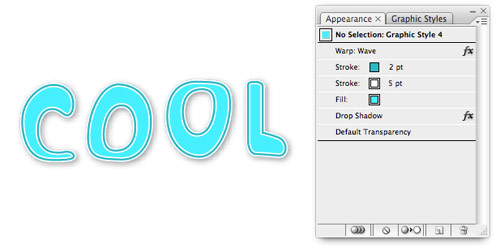
5. Finally, drag our appearance style in the Graphic Styles to create it.

6. Type a new text and select our new aqua effect. Your text effect will immediately take effect. That’s it. Now you can use the aqua graphic style on any shape. No need to go through the process of repeating creating styles for each object in Illustrator.

Back to 101 Illustrator Tips & Tricks »
nice to see a tutorial talking about this awesome tool. You could also improve it by saying its limitations, such as…. mesh objects can not be graphic style, and so on. 🙂