
In this simple but very time saving and useful tip, we will see how we can transform pattern fill in Illustrator without transforming the object on which the pattern fill is applied.
For example, if you have a pattern fill applied on a square or rectangle shape like this:

And, if you want to transform the pattern without transforming the square shape itself. Select your shape and go to Object>Transform>Rotate. in the resulting dialog box, uncheck the Object option. keep the Pattern option checked and specify the angle of rotation. Click on preview and you will see the changes as shown in the image below. You can see that the pattern is rotated at 45 degree while keeping the square sitting in its place.

Of course you can do this with other Transform options like, Move, Scale, Shear etc. as well! Likewise you can also choose to transform just the object and not the pattern or you can choose to transform both.
Also, to quickly transform the pattern, hold down the tilde key (~) while dragging the pattern filled shape with move, rotate, scale or shear tool.
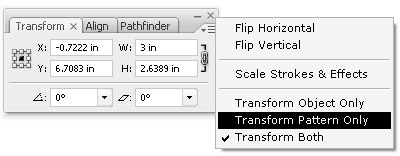
You can also transform pattern or object or both from Transform Palette.
Back to 101 Illustrator Tips & Tricks »
great small tip, wasn’t aware of this! thanks!
I just couldn’t leave your web site prior to suggesting that I really enjoyed the usual information a person provide for your visitors? Is going to be back steadily in order to inspect new posts